

It is 9:50 on a Tuesday and you are clay-barring the hood of a silver F-150 in someone’s driveway. Your phone lights up: a half-filled booking link, a text that says “how much for a full interior,” and a missed call from a number you do not know. Forty minutes later you call back, and the interior job already booked someone else. That afternoon you sit down to pick the software that is supposed to stop this, and the two names everyone throws at you are Jobber and Housecall Pro.
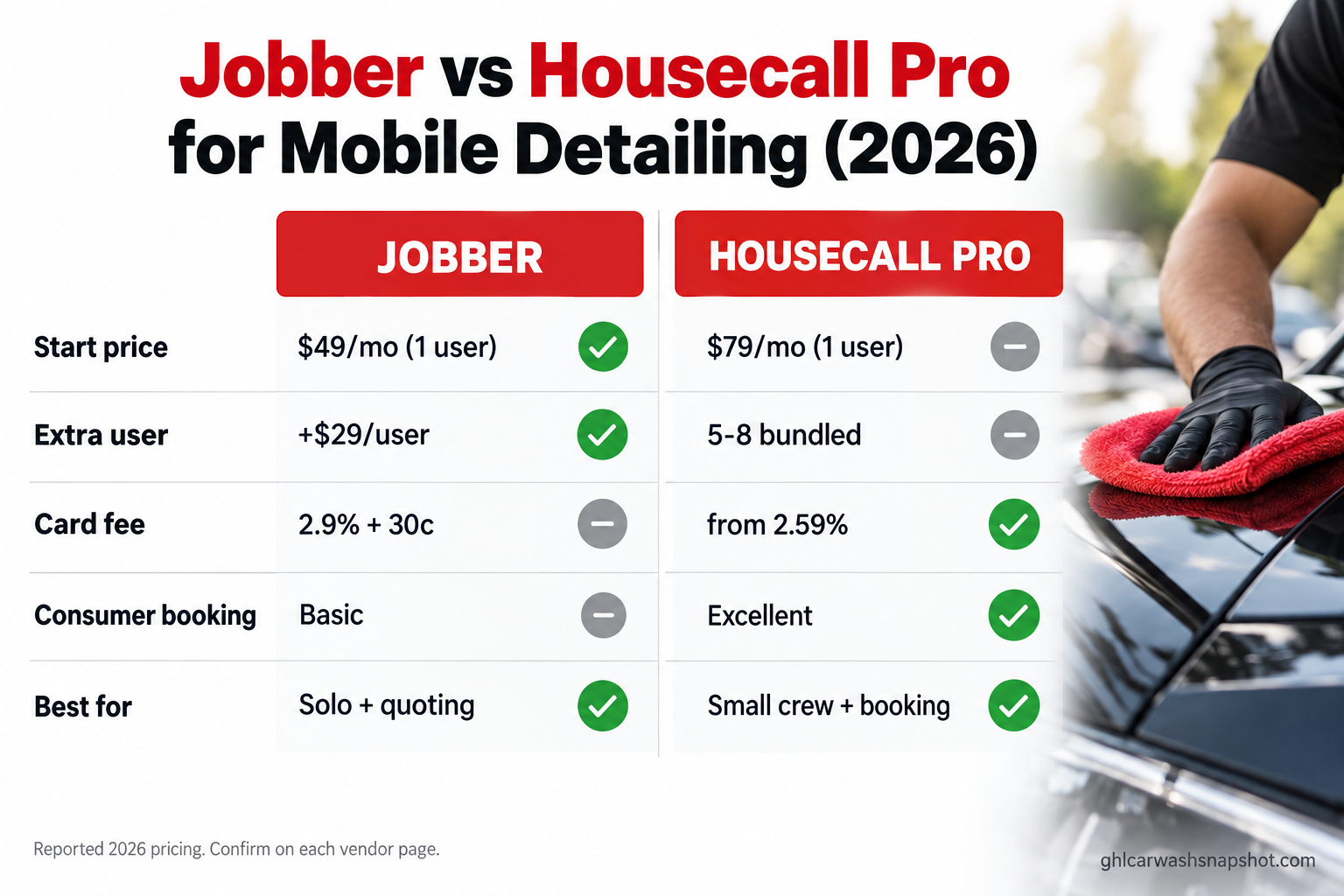
The short version. For a solo detailer, Jobber is cheaper to start (Core is a reported $49/mo month to month, versus Housecall Pro Basic at $79/mo) and its quoting is cleaner. Housecall Pro has the better consumer booking and deeper built-in marketing, but it costs more and its real price shows up once you add crew. Neither is built for detailing specifically, and neither answers the phone while your hands are wet. Pick on crew size and how you win jobs, then add an answering layer on top. The rest breaks down the real 2026 numbers and the three scenarios that decide it.
Table of contents
- The one-line difference
- What Jobber is
- What Housecall Pro is
- Pricing in 2026
- Eight things to score
- The gap both tools share
- Three real scenarios
- How each one breaks
- Steal these messages
- Objections, answered
- The honest verdict
- FAQ
The one-line difference
Jobber is a quoting-and-scheduling platform that keeps your money tight. Housecall Pro is a booking-and-marketing platform that keeps your calendar full. Both do the core jobs well, so the decision is not which one “works.” It is which fits how you run your business and how many people you put on it this year.
Two tools, two centers of gravity
Jobber: strongest at quotes, invoices, and cash flow. Low single-user entry, per-user fees as you grow. Best for the operator who thinks in jobs and margins.
Housecall Pro: strongest at consumer booking, reminders, and marketing. Higher entry, bundled seats on higher tiers. Best for the operator who thinks in bookings and repeat visits.
The US car wash and auto detailing market runs around $17.0 billion across roughly 16,745 businesses (IBISWorld), and mobile detailers are its most software-underserved slice: most tools assume a front desk, not a van with one person and wet hands. So the real question is not which platform has more features, but which one loses you fewer jobs.
What Jobber is, and who it fits
Jobber is a general field-service platform used across dozens of trades: quoting, scheduling, invoicing, a client hub, and payments in one app. You build a quote on-site, convert it to a job, schedule it, invoice it, and take the card without leaving the app. The quoting is the standout: line items, optional add-ons the customer approves, and clean follow-up on quotes gone quiet.
It fits the solo detailer or small crew who lives on quotes. If your jobs vary a lot (a $180 maintenance detail one day, a $1,200 two-stage correction the next), the quote-to-invoice flow handles that range without a fight. Where it pinches: the good automation and marketing live on higher tiers, and extra users cost about $29/mo each (Jobber pricing), which a three-van crew feels every month.
What Housecall Pro is, and who it fits
Housecall Pro is the other generalist heavyweight, built around the customer booking experience. Its booking flow, automated reminders, review requests, and marketing are more mature out of the box than Jobber’s, and the rebooking is strong, which matters when a chunk of detailing revenue is repeat maintenance work.
It fits the detailer who thinks like a home-service business and wants bookings to come in on their own. Where it pinches: the entry price is higher at $79/mo for Basic (Housecall Pro pricing), and the features that make people pick it tend to live on Essentials and Max. The seat math differs from Jobber’s and can cut either way by crew size.
Pricing: what you actually pay in 2026
Neither vendor makes the all-in number easy. Here are the reported figures off each pricing page; treat higher tiers as ranges and confirm the day you buy, because both ran price changes in 2026.
Jobber (reported 2026):
| Plan | Monthly (reported) |
|---|---|
| Core (1 user) | ~$49 |
| Connect | ~$139 (1 user) to ~$199 (5 users) |
| Grow | ~$199 (1 user) to ~$399 (10 users) |
| Plus | from ~$499 (5 users) |
Extra users about $29/mo each; annual intro rates rise at renewal. Card processing 2.9% + 30¢, tap-to-pay 2.7% + 30¢, bank transfer 1% (Jobber pricing).
Housecall Pro (reported 2026):
| Plan | Users | Monthly / Annual |
|---|---|---|
| Basic | 1 | $79 / $59 |
| Essentials | 5 | $189 / $149 |
| Max | 8 | $329 / $299 |
Extra users on Max about $35/mo each. Card processing “as low as 2.59%,” bank transfer 1% (Housecall Pro pricing).
The seat models are the part that bites. Jobber starts cheap for one person and adds a flat per-user fee as you grow. Housecall Pro starts higher but bundles five or eight seats into the plan price, so a small crew rides one tier without per-user charges. That flips the “cheaper” answer by headcount.
The chart shows the trap both ways. Solo, Jobber wins. At three people it is still cheaper, but only because Core is thin; put your crew on the tier that actually has marketing and automation (Connect or Grow) and the gap closes or reverses. Price the plan you will need in a year, not the one you are on today.
Then there is processing, the fee nobody adds up. A detailer running $40,000 a month through cards pays roughly $14,000 a year at 2.9% versus about $12,400 at 2.59%, a gap near $1,500 a year (vendor pricing pages).
The eight things a detailer should score
Price is the loudest number, rarely the deciding one. Score both on the eight things that move a detailing business.
| What you are judging | Jobber | Housecall Pro |
|---|---|---|
| Starting price (1 user) | ~$49/mo, lower annual | $79/mo, $59 annual |
| Extra-seat cost | ~$29/user/mo | 5–8 bundled, then ~$35/user |
| Quoting / estimates | Excellent, client self-approve | Good |
| Consumer booking app | Basic | Excellent |
| Reminders + rebooking | Good | Excellent |
| Marketing / review requests | On higher tiers | Deeper, built in |
| Card processing | 2.9% + 30¢ | from 2.59% |
| Detailing-specific features | None native | None native |
Two rows decide most detailers. If you win work by quoting (correction jobs, ceramic, fleet), Jobber’s estimate flow earns its keep. If you win work by being easy to book and pulling repeat customers back, Housecall Pro earns its. Score the one thing that drives your revenue.
Neither handles detailing-specific work the way a purpose-built tool does. If VIN scanning, per-vehicle packages, or multi-vehicle jobs matter, see the detailing-native options in the best mobile detailing software roundup first. This one is for the detailer who already wants a mature generalist platform.
The gap both tools share
Score both on the thing that actually loses detailers money, and they fail the same way: neither answers the phone, text, or DM while you are mid-job.
Both send reminders and let a customer book through a link. Neither picks up a call from a new number or texts back a missed call before that lead books your competitor. For a shop with a front desk it is invisible; for a van with one operator and polish on both hands, it is the whole problem.
The numbers are brutal. Leads called within one minute of inquiry are 391% more likely to convert (Velocify, via MPA Magazine), and firms that reach a lead within an hour are nearly 7x more likely to qualify it (HBR). A reminder fired two days out does nothing about the call you could not take at 9:50am. So the smart move is not “Jobber or Housecall.” It is either one plus a missed-call text-back and after-hours layer in front of it, so nothing dies in voicemail.
Three real scenarios
The right pick changes with the size of the operation. Run the same decision three ways.
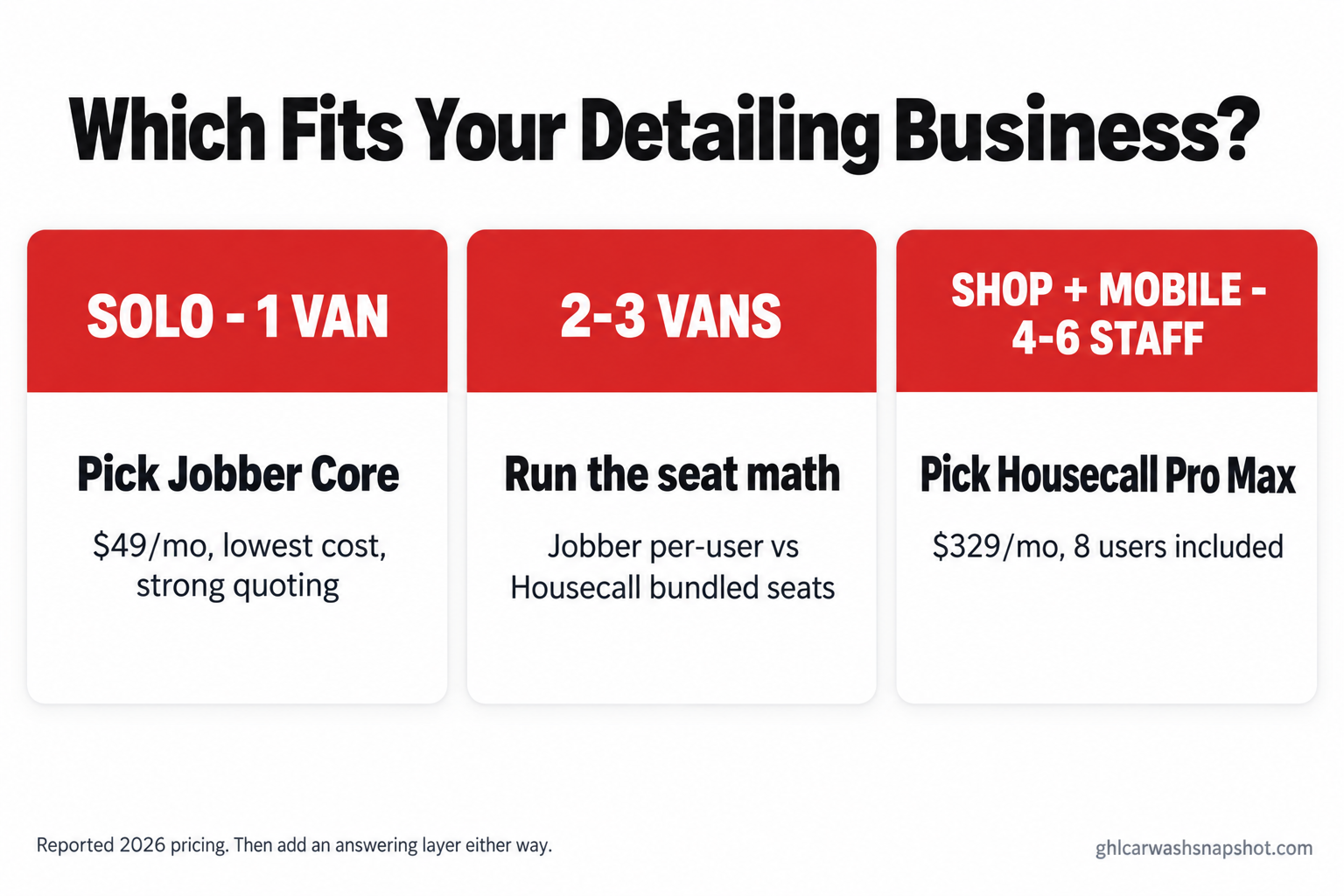
Scenario one: the solo detailer, one van, $5,000 to $8,000 a month. Jobber Core at ~$49/mo wins on cost and gives clean quoting for jobs from a quick maintenance wash to a full correction. Housecall Pro Basic at $79/mo costs more but hands you a better booking experience if most work comes in through a link. Either is fine. Your biggest leak is the calls you cannot answer mid-detail, so the highest-return spend is an answering layer, not a fancier scheduler.
Scenario two: the growing crew, two or three vans, hiring. Now seats decide the bill. Jobber Core plus two users is about $107/mo, cheap on paper, but Core is thin, so you will move to Connect or Grow where the price climbs. Housecall Pro Essentials bundles five seats for $189/mo flat, which can undercut a loaded Jobber tier. This is where operators layer the full detailing system on top, because a missed lead now costs a crew’s idle hour.
Scenario three: the shop-plus-mobile hybrid, four to six staff. Housecall Pro’s bundled seats often win outright: Max includes eight users for $329/mo before any per-user fee, while matching that on Jobber means a higher tier plus $29 a seat. You also run more repeat work at this size, so its rebooking pulls its weight. Score it on total seats plus repeat-revenue share.
Sources: Jobber and Housecall Pro pricing; Velocify via MPA; HBR.
How each one breaks
Every tool has a failure mode. Knowing it before you sign saves the switch later.
- Jobber: the tier jump. Core looks cheap, but automation, marketing, and the features that keep your calendar full live on Connect and Grow. Guard: price the plan with the features you need, and check the annual intro rate against the renewal rate (Jobber notes renewals rise).
- Jobber: detailing is manual. No VIN scan or per-vehicle logic; you build packages by hand. Guard: save them once as templates so every estimate is two taps.
- Housecall Pro: price creep. Higher entry tier, and the good stuff is on Essentials and Max. If you are solo, you pay for a platform built for a crew. Guard: move up only when a feature, not the seat count, forces it.
- Housecall Pro: per-user on Max. Past the eight included seats it is about $35 a head. Guard: count your real 12-month headcount first.
- Both: the answering gap. Neither closes the lead you miss mid-job. A reminder is not a reply. Guard: put a missed-call text-back layer in front of either one.
- Both: deposits do not fix no-shows alone. Guard: pair the deposit with the reminder-and-confirm sequence that stops last-minute cancellations.
Steal these: the messages that stop the leak
Whatever platform you land on, these are the messages that save jobs. Load them once and let the system send them. Keep them short, human, and signed.
The missed-call text-back (fires the second you can’t pick up):
Hey, it’s Marcus at Apex Mobile Detailing. Sorry I missed you, I’m mid-detail. Text me the vehicle and what you’re after (full interior, exterior, correction?) and I’ll send a quote within the hour. Want the next open slot this week?
The deposit request (on booking a bigger job):
You’re booked for the two-stage correction Sat at 9am. To hold the slot I take a $75 deposit that comes straight off the total. Secure link: [deposit link].
The reminder-and-confirm (the day before, to kill no-shows):
Reminder: your detail is tomorrow at 9am at [address]. Reply C to confirm or R to reschedule. I’ll need clear access to the vehicle and a water spigot if you’ve got one.
The review request (two hours after you finish):
Hope the truck’s looking right. If you’ve got 30 seconds, a quick Google review genuinely helps a small shop like mine: [review link]. Thanks for the work today.
The win-back (45 days after the last job):
It’s been six weeks since we detailed the F-150. Interiors start creeping back around now. Want me to grab a maintenance slot this week? Returning-customer rate applies.
Those five do more for revenue than any feature on either pricing page. The platform schedules the job; the messages keep it from leaking first.
Objections, answered
“I already use Jobber (or Housecall) for another trade. Should I switch?” No, not for its own sake. If a platform already runs your business and you know it, switching rarely beats the gain. Keep it, save your detailing packages as templates, and spend your energy on the answering layer. The leak is almost never the scheduler.
“Isn’t a detailing-specific tool better than either of these?” For VIN scanning, per-vehicle packages, and multi-vehicle jobs, yes, and the detailing-native options are cheaper to start. But if you want a broad, mature platform and will grow a crew, these two are safest.
“Which is cheaper over a year?” Solo, Jobber. For a two-to-three van crew it depends on which Jobber tier you actually need, and Housecall Pro’s bundled seats can win. For a bigger hybrid shop, Housecall Pro Max often wins on seats. Run your real headcount and card volume through both pricing pages, because the first-month price and the 12-month price are different animals. If you would rather not run any of it yourself, a field-service VA can handle the scheduling and follow-up so you stay in the bay.
The honest verdict
There is no single best field-service tool for mobile detailing. Jobber is the sharper money tool: cheapest to start, best quoting, per-seat cost that climbs as you hire. Housecall Pro is the sharper demand tool: better consumer booking and rebooking, with bundled seats that reward a small crew and a higher floor that punishes a true solo.
Pick Jobber if you are solo or nearly so, win work by quoting, and want the lowest cost. Pick Housecall Pro if you run a small crew or a shop-plus-mobile setup, win work through booking and repeat customers, and the bundled seats fit your headcount. Then remember the thing neither does: it will not answer the call you miss at 9:50 on a Tuesday. Wire an answering and follow-up layer in front of it, and you stop losing the jobs both platforms quietly let slip.
FAQ
Is Jobber or Housecall Pro cheaper for a solo mobile detailer in 2026?
Jobber is cheaper to start: Core is a reported $49/mo month to month for one user, versus Housecall Pro Basic at $79/mo ($59 billed annually). Solo, Jobber wins on cost, though Housecall Pro offers stronger consumer booking for the extra money. Confirm current rates on each vendor's pricing page.
How do the per-user fees compare?
Jobber charges about $29/mo per extra user. Housecall Pro bundles five users into Essentials and eight into Max, then about $35/mo per user on Max. So Jobber is cheaper for a small add, but Housecall Pro's bundled seats can win for a three-to-eight person crew. Count your real 12-month headcount first.
What are the card processing fees on Jobber vs Housecall Pro?
Jobber reports 2.9% + 30 cents per card, 2.7% + 30 cents for tap-to-pay, and 1% for bank transfers. Housecall Pro advertises card processing 'as low as 2.59%' and 1% for bank payments. Both are 'starts at' rates, so a keyed-in payment costs more. On high card volume the gap can top a thousand dollars a year.
Are Jobber and Housecall Pro built for detailing specifically?
No. Both are general field-service platforms. Neither has detailing-native features like VIN scanning, per-vehicle package pricing, or multi-vehicle jobs; you build packages manually as templates. If those vehicle-specific features matter, a detailing-native tool like Urable or Mobile Tech RX may fit better.
Will either tool stop me losing leads when I can't answer the phone?
Not on their own. Both send reminders and let customers book through a link, but neither answers a call, text, or DM from a new lead while you are mid-job. Since leads contacted within a minute convert far better than those reached 30 minutes later, add a missed-call text-back and after-hours answering layer in front of whichever scheduler you pick.
Can I use Jobber or Housecall Pro to take deposits and reduce no-shows?
Yes, both collect a deposit at booking, which helps. But a deposit alone does not stop no-shows. Pair it with a reminder-and-confirm sequence the day before so the customer confirms or reschedules instead of ghosting. The deposit plus the reminder cadence is what protects your calendar.
Related posts
- Best Software for Mobile Detailing in 2026: Urable vs Mobile Tech RX vs Jobber vs Housecall Pro
- Losing Mobile Detailing Leads After Hours? The Text-Back System That Catches Them
- Why Mobile Detailing Customers Cancel at the Last Minute (And the Booking System That Stops It)
- How to Price a Ceramic Coating Job in 2026: The Variable-Cost Estimator That Protects Your Margin
- Mobile Detailing Wastewater Rules: What the Clean Water Act Actually Requires