

It is 8:15 on a Tuesday. You are halfway through a ceramic prep in one suburb when your phone buzzes: “Hey, are you still coming at 9? You said you’d be here.” You did say that. You also booked a 9am interior twenty minutes the other direction, because you took it over DMs on Sunday night and never wrote it down. Two customers, one of you, no way to be in both driveways, and you have not opened a bottle of product yet.
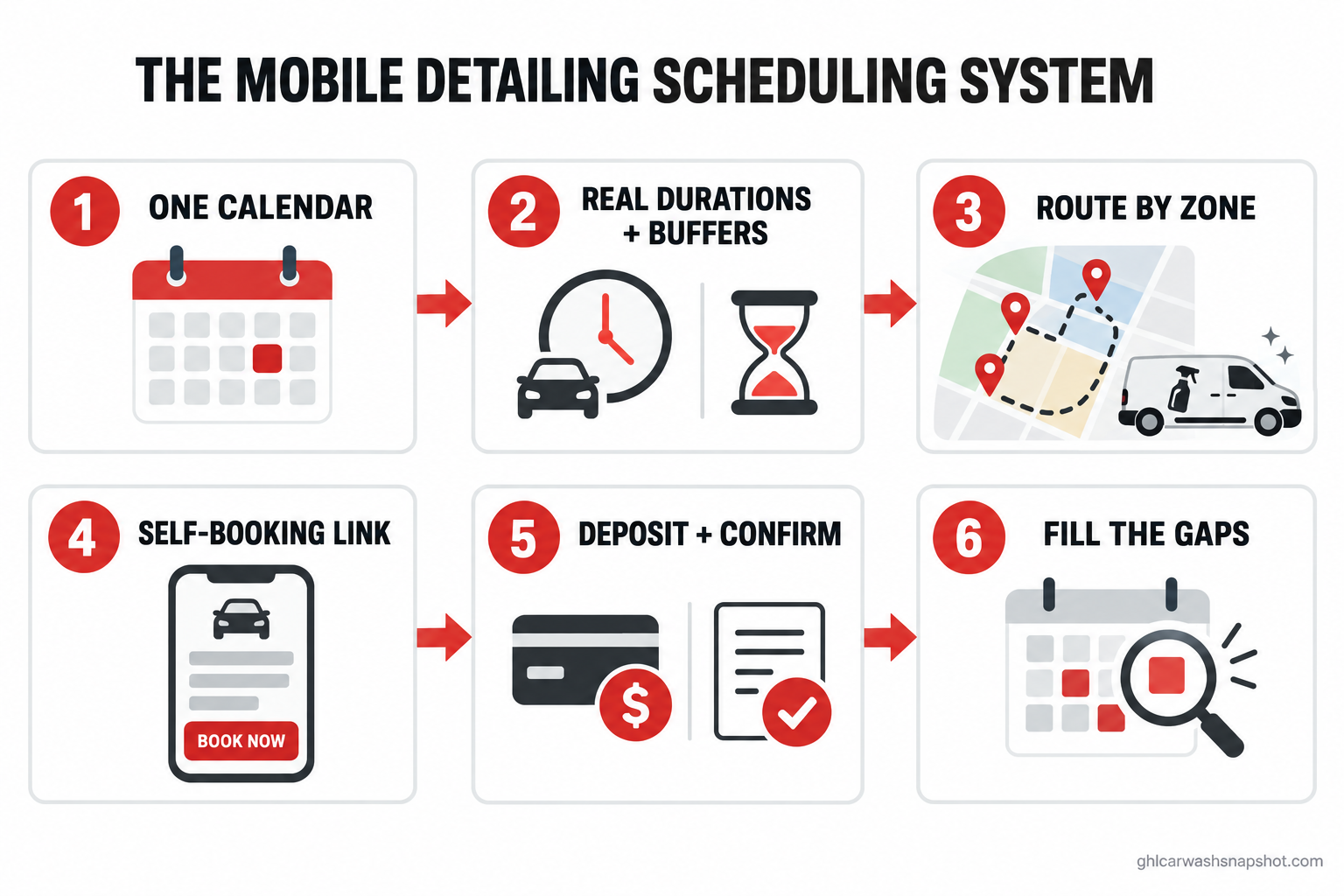
Mobile detailing scheduling breaks for reasons unrelated to how good you are at detailing. The calendar lives in three places at once (texts, DMs, your head), jobs get stacked with no real duration or drive-time between them, and the only person who can see your availability is you. The fix is one booking system that holds a single calendar, blocks real time for each job and the drive to it, and lets customers self-book only the slots that are truly open. Do that and the double-bookings stop and your week stops falling apart by 10am. Below is the full system, with the copy you can steal and how each stage breaks if you cut a corner.
Table of contents
- What a broken schedule actually costs
- Why mobile detailing scheduling breaks
- The scheduling system, stage by stage
- Stage 1: One calendar, one source of truth
- Stage 2: Give every job a real duration and a buffer
- Stage 3: Route by geography, not by who called first
- Stage 4: A booking link that only sells open slots
- Stage 5: Lock and hold the slot
- Stage 6: Fill the gaps at end of day
- The tools, compared honestly
- Three real scenarios
- Objections, answered
- FAQ
What a broken schedule actually costs
A scheduling mess feels like a bad morning, not a cost. Price it out and the number gets ugly.
A double-booking does not lose you one job, it loses you two: you cancel one, burn goodwill with the customer you bump, and deliver a rushed version of the one you keep. At a $180 average ticket, one un-backfilled double-booking a week is close to $9,400 a year out of two driveways you never should have promised.
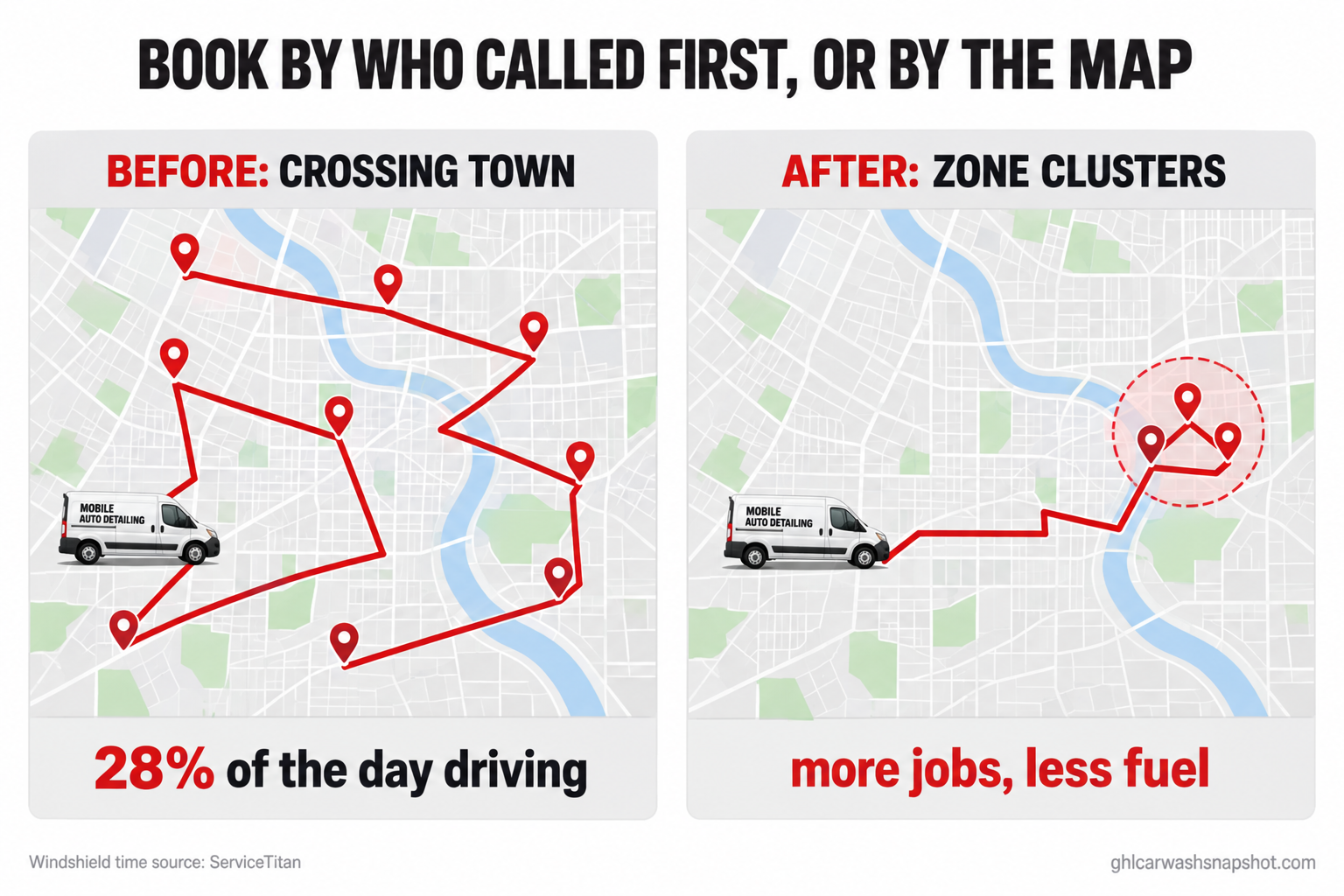
Then there is the driving. A field service technician spends about 28% of the workday behind the wheel (ServiceTitan), and in a one-van shop that windshield time is your own billable hours evaporating on the highway.
A schedule run from memory has a ceiling you keep hitting: 72.83% of small businesses still schedule primarily over email, only 33.65% use software, and 31.98% say double bookings and conflicts come directly out of how they schedule (Small Business Trends, 2026). Almost nobody in mobile detailing has fixed this, so the shops that do get an unfair edge.
Sources: ServiceTitan, Small Business Trends, 2026, Tebra, 2026.
Why mobile detailing scheduling breaks
You are not a fixed-site wash. A tunnel asks only whether the lane is open. Your “location” changes every job, the drive between jobs is part of the job, and the person who knows the calendar is the one elbow-deep in a wheel well with wet hands.
Three things break it, over and over. The calendar is scattered: a booking by text, the next by DM, a third by phone, each living where it landed, none talking to the others. Jobs have no real size: you book “9am” and “11am” as if a full interior takes two hours and the next driveway is next door, and it does not and it is not. You are the bottleneck: the only way to check availability is to ask you, and you are detailing, so the customer who messages at 8pm has already messaged two other detailers before you surface.
None of that is a discipline problem. You are running a geography-dependent appointment business on tools built for a front desk that does not move. The system below fixes the tools.
The scheduling system, stage by stage
Six stages, each closing a specific leak, from one calendar through routing, self-booking, deposits, and end-of-day gap fill. A tool that holds the calendar, blocks the drive, and fires the texts on its own is what makes it run.
Stage 1: One calendar, one source of truth
Take one thing from this piece: there is exactly one calendar, and every booking from every channel (text, DM, call, website, car-show walk-up) writes to it before it counts as booked.
Set it up. Pick one master calendar (your booking tool’s, synced two-way to your phone), and keep one rule: nothing is booked until it is on that calendar. When a DM comes in, you do not reply “sure, Saturday works,” you send the booking link or put it on the calendar right then while looking at it.
Steal this, the line that moves a DM onto the real calendar:
Happy to get you in! Easiest way to lock a real time is right here, it shows my actual openings so we don’t play phone tag: [booking link]. Pick what works and it’s yours.
How it breaks. The “soft hold,” a time you promise out loud and mean to write down later, is the classic failure, because later comes after you promised the same slot to someone else. The other is a calendar that does not sync to your phone, leaving you to book blind in the field.
Stage 2: Give every job a real duration and a buffer
A slot is not a start time. It is a start time plus the work plus the drive to the next one. Book start times and pretend the rest is free, and 9am and 11am turn into a 12:40 apology.
Set it up. Write down the true length of each service from a few real jobs, not your best day, and build those durations into your booking tool so it blocks the real time. Then add a standing buffer after every job for pack-up, notes, and a short drive. The buffer is why job three still starts on time.
How it breaks. Booking optimistic durations is the most common self-inflicted wound: you know the interior takes three hours, you book two because the customer sounded eager, and the rest of the day is poisoned. Zero buffer is the other: the first job running long makes you late to every job after it.
Stage 3: Route by geography, not by who called first
Here is the trap unique to mobile work: you book in the order people call, so Tuesday is a job north, a job south, and a job back north, crossing the metro instead of working it. That is 28% windshield time (ServiceTitan) climbing toward 40%, the quiet reason you feel busy but the deposit slip is thin.
Set it up. Zone your service area and assign days to zones: north side Tuesday and Thursday, south side Wednesday and Friday, whatever fits your map, so the booking link can steer each customer into the right day for their address. The goal is clusters: three jobs within ten minutes of each other shrink the drives to nothing and let you fit a fourth.
Steal this, the geographic boundary that keeps the job:
I’m on the north side Tuesdays and Thursdays and the south side Wednesdays and Fridays, keeps me from spending your money on gas. For your address, Thursday’s the one. Here’s what’s open: [booking link].
How it breaks. Treating every request as a drive-anywhere emergency blows up the cluster you built, and the driving burns you out: drive too much and you are 27% more likely to walk away from the work (Maptive). Hold the zones; a rush job can carry a travel surcharge.
Stage 4: A booking link that only sells open slots
This is the stage that kills double-booking at the root. When customers book themselves against a live calendar, the slot you already hold is simply not on the menu, so the system cannot offer the same time twice. It also answers the 8pm inquiry while you sleep, where so many mobile detailing leads leak out after hours. For the deep version, see the after-hours text-back system for detailers.
Set it up. Put a booking link everywhere a customer meets you: Instagram bio, Google Business Profile, missed-call auto-reply, website, quote follow-ups. It reads from your one master calendar, respects your Stage 2 durations and buffers, and offers only the open, in-zone slots from Stage 3. For the wider setup, see our guide to online booking for car washes and detailers.
Steal this, the missed-call auto-reply (the single highest-return text a detailer can automate):
Sorry I missed you, I’m with a car and can’t grab the phone. Fastest way onto the schedule is this link, it shows my real openings: [booking link]. Or text me what you drive and what you want and I’ll sort it the second I’m free.
How it breaks. A booking link not wired to your live calendar is worse than none, because now two systems promise slots and you double-book with extra steps. Hiding it is the other failure: it belongs in the bio, the auto-reply, and the review requests.
Stage 5: Lock and hold the slot
An open slot someone booked for free is only half-booked, and a slot nobody is reminded about reopens as a hole on the morning you least expect. Two moves close both leaks: a deposit, and a reminder cadence with one-tap reschedule.
Set it up. Take a deposit of 20% to 30% of the job at booking through the link with a card on file, and the second it clears, an automated text confirms date, time, address, and price. Then run a light cadence: a nudge 24 hours out and a morning-of heads-up with your arrival window, each carrying a reschedule link that books a real new slot with the deposit riding along, so a would-be no-show becomes a clean move. The full depth is in why detailing customers cancel last minute and the system that stops it.
Steal this, the morning-of text that doubles as a reschedule offer:
Morning! Got you down for today, 10am-1pm window at 214 Oak St, on my way after my first stop. If today slipped, no stress, grab a better time here and your deposit moves with you: [reschedule link].
How it breaks. A deposit below 20% stops changing behavior, and a confirmation you send by hand arrives late, which defeats “instant.” A reminder with no reschedule link announces the appointment instead of protecting it.
Stage 6: Fill the gaps at end of day
A hole in tomorrow is not bad luck, it is unsold inventory. When a reschedule or cancel reopens a slot, the system should fill it, not leave you to find a dead two hours at 7am.
Set it up. Keep a real waitlist of customers who asked for “sooner if anything opens,” plus a short pool of past clients due for another detail. When a slot reopens, an automated text goes to the nearest waitlisted customer first, then the win-back list, carrying your booking link so the first to tap it takes the slot and it lands back on the one calendar.
Steal this, the gap-fill text:
A spot just opened tomorrow, Thursday 10am, and you’re first on my list since you’re right in the neighborhood. Want it? Tap here and it’s yours before I offer it to anyone else: [booking link].
How it breaks. Blasting the open slot to everyone gets five replies for one slot and four annoyed customers, so offer it nearest-first with a short fuse. And a waitlist in your head is no waitlist.
The tools, compared honestly
You do not strictly need software, but doing it by hand is a second job. Here is how the common options stack up on the scheduling and routing pieces that matter, with pricing as third-party directories reported it in 2026 (confirm your own quote).
| Tool | Reported price | Self-booking | Drive-time / routing | Deposits & reminders |
|---|---|---|---|---|
| Urable | from ~$45/mo; Pro ~$83/mo | Yes | Yes (map routing, higher tier) | Yes |
| Mobile Tech RX | from ~$30/mo (directory-reported) | Yes | Limited | Yes |
| Jobber | Core $49 to Plus $499/mo | Yes | Yes | Yes |
| Housecall Pro | Basic $79 to Max $329/mo, +$35/user | Yes | Yes | Yes |
| Car Wash Snapshot (GoHighLevel) | $997 one-time install | Yes | Via zone-based booking rules | Yes |
The honest read: detailing-specific tools like Urable fit the trade well, the generalists are polished but priced for crews, and if you want booking, deposits, reminders, and win-back from one place you own outright, that is the gap the snapshot fills. For more, see Jobber vs Housecall Pro for mobile detailing and the detailing price sheet template.
Three real scenarios
The system is the same; how you run it shifts with the shape of your business.
Solo, one van. You are owner, detailer, and booking desk, and your biggest leaks are the scattered calendar and opposite-ends-of-town routing. Start with Stage 1 and Stage 3: every booking onto one synced calendar, and zone your week so you stop crossing the metro twice a day. Add the self-booking link so the 8pm inquiry books itself while you sleep.
Two to three vans. The calendar is shared now, so a double-booking means two of your people promised the same customer or two customers got the same van. Stages 1, 2, and 4 are non-negotiable: one calendar everyone writes to, real durations, and a booking link that assigns to whichever van is open and in-zone. Routing now saves fuel across the fleet, which is where a generalist like Jobber earns its higher price.
About to hire. You are drowning in bookings and scared to hand over a calendar that lives in your head. Build the full system before the hire, so the new person sees the one calendar, follows the zones, and can trust every slot is real. That is the difference between training someone into a clean operation and into your chaos.
Objections, answered
“Customers like texting me directly, won’t a booking link feel cold?” Only if you hand it over coldly: lead with a human line, then send the link as the fast way to lock a real time. Customers are attached to getting booked, not to phone tag, and 69% would rather do it online anyway (Tebra, 2026). You still answer the texts.
“I already have a scheduling app, isn’t that enough?” A calendar app holds times. It usually does not block drive-time buffers, steer bookings by zone, take a deposit, or fill a reopened slot, which is the gap that lets double-bookings and dead drives back in.
“Zoning my week means telling customers no sometimes, won’t I lose jobs?” You lose a few impulse one-offs and keep your margins. “I’m on your side of town Thursday” is a plan, not a rejection, and for the rare job worth the detour, a travel surcharge makes the math work.
FAQ
What is the best way to stop double-booking in a mobile detailing business?
Run one master calendar that every booking channel writes to, and put a self-booking link in front of customers that reads from that live calendar. A slot that is already taken will not show as available, so the system cannot offer the same time twice. Double-booking is almost always a scattered-calendar problem that one source of truth fixes at the root.
How long should I block for each detailing job?
Block the real work time plus a buffer, not an optimistic guess: roughly 1 hour for an express wash and vacuum, 3 hours for a full interior and exterior, 4 to 5 hours for a one-step correction, and a full day for a ceramic coating. Add a standing 30-minute buffer after every job, then adjust from your own numbers.
How much time do mobile detailers lose to driving?
A field service technician spends roughly 28% of the workday behind the wheel (ServiceTitan). For a solo detailer that is your own billable time, so routing jobs by zone and day to cluster them is one of the fastest ways to get hours back.
Should mobile detailers take a deposit when booking?
Yes, usually 20% to 30% of the job applied to the final bill, collected through the booking link with a card on file. A deposit turns a free hold into a real commitment and cuts the casual cancellations that reopen holes in your calendar. Pair it with an instant automated confirmation.
Do I need special software, or can I schedule by hand?
You can run the system by hand, but it becomes a second job: you are the calendar, the router, the deposit-taker, and the reminder sender. Software that holds one calendar, blocks drive-time buffers, takes deposits, and fires reminder and reschedule texts automatically is what makes it run without you touching your phone mid-job.
Your schedule does not break because you are bad at detailing, it breaks because a geography-dependent appointment business is run on a calendar in your head. Put one calendar in charge, give every job its real size and drive time, and let customers book only what is truly open.